

Most pros who ask “how do I stop giving customers my personal cell number” want the same thing: their evenings back. The fix is to give customers a business channel that works better than your cell, then stop printing, posting and handing out the personal number. Get a business number that rings the phone you already carry, keep texts and photos in one thread, and move existing customers over one reply at a time.
Why does a personal cell number cause trouble for a service business?
A personal cell number puts work and home on one screen, so every customer text follows you to dinner, a kid's game and your day off. Customers can't tell your business hours from your bedtime when the number is the one your family uses.
The bigger problem shows up as you grow. When customer history lives in your personal text thread, nobody else can see it: not a helper covering a Saturday, not an office person, not even you on a new phone. The job photos, the price you quoted and the gate code all sit in one private account.
Where do I start if I want to stop giving customers my personal cell number?
Start by finding every place your personal number already lives, because customers keep using whatever number they saw last. Write the list in a notebook:
- Invoices, estimates and receipts
- Truck lettering, magnets and yard signs
- Google Business Profile and any other listings
- Business cards, door hangers and flyers
- Your voicemail greeting and email signature
Next, get a business number. For a one-person operation, a second number that rings your existing phone separates customer calls from personal calls without a second handset. Set the number up under the business, not one person's account, so it can move with you if you change phone providers or hand calls to someone else.
Then set up the basics on the business line: a short greeting, an after-hours message, voicemail you can read as text, a missed-call text, and a written rule for who calls back and by when. Replace the old number everywhere on your list before you ask customers to switch.
How do I keep all my customer messages in one place?
Keep customer messages in one place by choosing one business channel for texts, photos, estimates and bills, and answering every customer there, even when they reach you somewhere else. One thread per customer keeps the quote, the photos and the “can you come Thursday?” text together when you need them.
For a small crew, a shared business inbox or phone queue keeps missed calls, voicemails and texts visible while the owner is driving, on a roof, under a sink or off work. Every text should name the business, so a customer doesn't save a technician's own number as the company's.
Should my small service business have a customer app?
A small service business benefits from a customer app when the app answers the questions customers would otherwise text you at night. Most of those texts ask the same few things: when are you coming, what did you find, what do I owe, and can I ask you something.
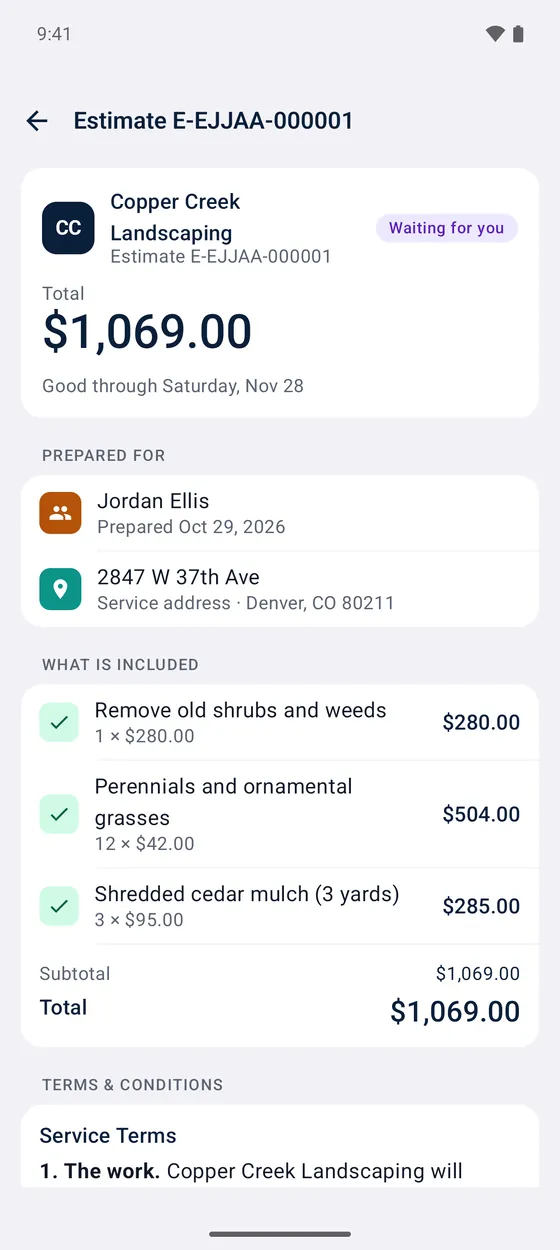
A good customer app shows the next visit and arrival window, what got done with photos, estimates to read and approve, bills to pay, and one place to send a message. If the app costs customers money or makes them jump through hoops, they'll go back to texting your cell.
How do I get customers to actually use an app?
Customers use an app when the invite arrives at the moment they need something from you, like an estimate to approve or a bill to pay. A cold “download our app” message gets ignored, while “your estimate is ready here” gets opened.
- Send the invite with the first estimate or the first bill.
- Show a new customer the app once, in person, at the end of the first visit.
- When a customer texts your personal cell, reply once with the business link and answer the question there.
- Keep the app free for customers, with nothing to set up before they can see their estimate.
What are the rules for texting customers?
Texting customers takes their permission, and the kind of permission depends on what the text is for. The FCC's guide to unwanted robocalls and texts says businesses need a customer's prior consent before sending autodialed texts to a cell phone; commercial texts generally require written consent, while informational texts may rely on oral consent.
Keep the record of permission for marketing texts separate from permission to text about an existing estimate or appointment. Keep discounts and upsells out of reminders sent to customers who only agreed to service updates. For sales calls, the FTC's Telemarketing Sales Rule guide generally bars outbound telemarketing calls before 8 a.m. or after 9 p.m. in the customer's local time, and the FTC's Do Not Call Registry FAQ says a sales robocall is generally illegal without the consumer's written permission.
State rules can add more, and they vary from state to state. Check with your state attorney general's office or an attorney before you text customers in bulk or send anything promotional.
Worked example: a solo plumber moving off a personal cell
Here's how the switch could look for a one-truck plumber. All numbers and prices below are examples.
In week one, the plumber keeps tally marks in a notebook: 40 customer calls and texts, 34 of them to the personal cell. Most came from old invoices and the truck magnet. On a typical workday, 12 calls come in and 4 get missed while the plumber is under a sink.
The plumber sets up a business number that rings the same phone, updates the invoice and estimate templates, orders a new truck magnet and changes the Google Business Profile. Missed calls now get one text back:
“We're on a job. Reply with your address and the work needed, or call this number again after 4 p.m.”
When a regular customer texts the old cell about a leaking water heater valve, the plumber replies once with the business link, then sends photos and a $225 repair estimate (example price) through the business channel. The personal cell stops appearing on paper.
| Personal cell | Business channel | |
|---|---|---|
| Who sees the history | Only you | Anyone you allow |
| New phone | History may stay behind | History stays with the business |
| On truck and invoices | Your private number | A number you can hand off |
| Sick day | Hard to cover | A helper can answer |
How do I measure whether customers are off my personal cell?
Measure the switch with one number: the share of customer contacts that still reach your personal cell. Tally one normal week of calls and texts, then use this formula:
Personal-cell share = contacts on personal cell ÷ all customer contacts × 100
In the example above, 34 ÷ 40 × 100 = 85%. Count again every two weeks. If week six shows 6 of 40 contacts on the personal cell, the share is 15%, and those 6 names are the next customers to get the business link.
A notebook tally works fine for a one-truck business. Once a helper starts answering customers too, the count belongs in the same place as the messages.